When headless fits
A quick look at when a headless build is worth it — and when a themed WooCommerce store is the better choice.
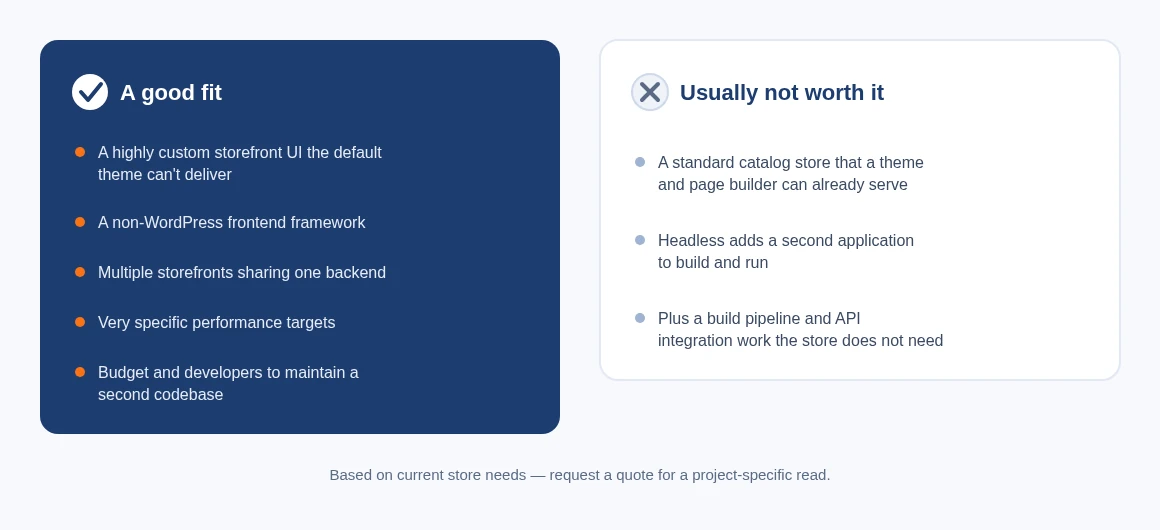
A headless build is a good fit when a WooCommerce (or other) store needs a storefront experience the default theme can't deliver — for example a highly custom UI, a non-WordPress frontend framework, multiple storefronts sharing one backend, or very specific performance targets — and the team has the budget and developers to maintain a second codebase. It is usually not worth it for a standard catalog store that a theme and page builder can already serve: headless adds a second application, a build pipeline and API integration work that a themed WooCommerce store does not need.
How we deliver a headless commerce build
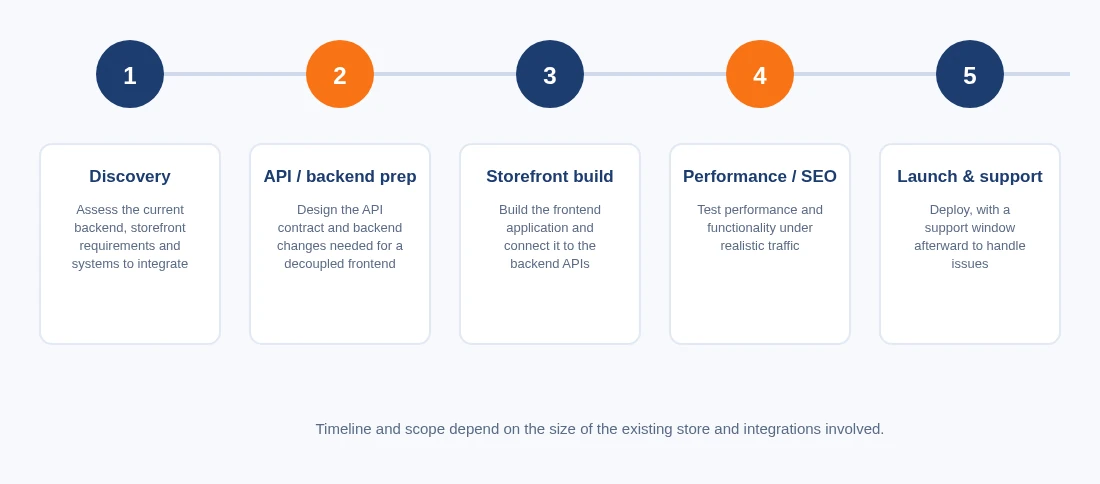
- Assess the current backend, storefront requirements and any systems that need to integrate.
- Design the API contract and the backend changes needed to support a decoupled frontend.
- Build the frontend application and connect it to the backend APIs.
- Test performance and functionality under realistic traffic.
- Deploy, with a support window afterward to handle issues.
Timeline and scope depend on the size of the existing store and the integrations involved — request a quote for a project-specific estimate.
What we deliver
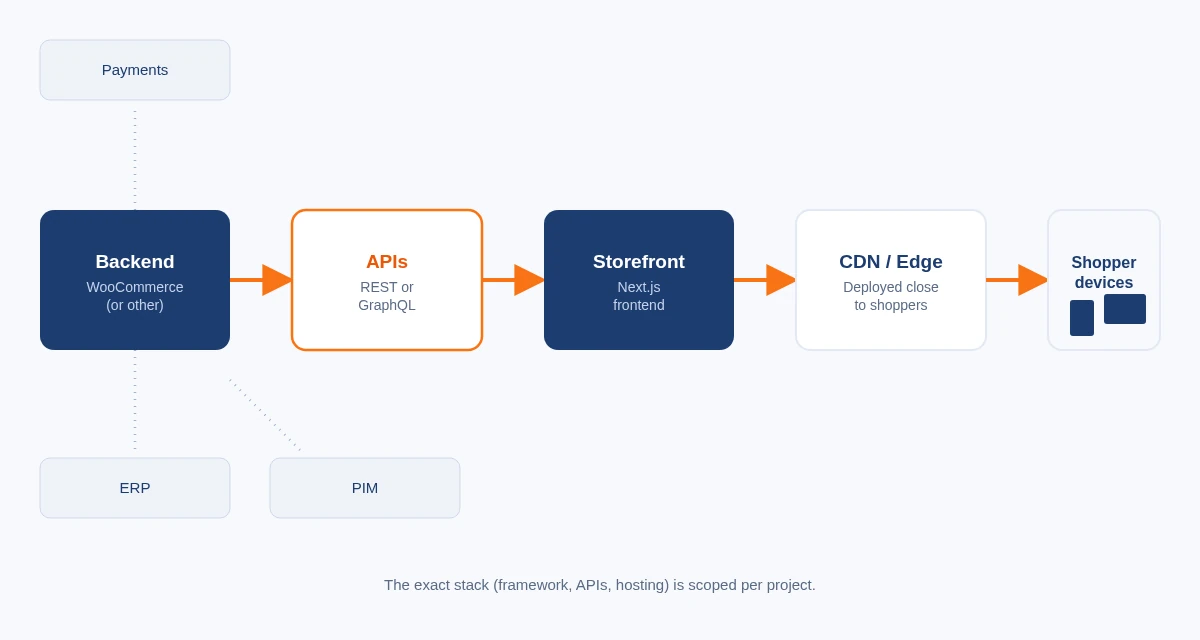
The architecture Cmsmart builds for a headless commerce project.
 New
New Headless commerce architecture
The common pattern is: a WooCommerce (or other ecommerce platform) backend stays the system of record for products, pricing, cart and orders; a separate frontend — typically built with Next.js and React — renders the storefront and calls the backend through its REST or GraphQL API; and the frontend is deployed to a CDN/edge host for fast page loads. The exact stack (which frontend framework, which APIs, which hosting) is scoped per project, not fixed.
Frequently Asked Questions
You can find the best answers when you catch problems
- Assess the current backend, storefront requirements and any systems that need to integrate.
- Design the API contract and the backend changes needed to support a decoupled frontend.
- Build the frontend application and connect it to the backend APIs.
- Test performance and functionality under realistic traffic.
- Deploy, with a support window afterward to handle issues.
Timeline and scope depend on the size of the existing store and the integrations involved — request a quote for a project-specific estimate.
Headless builds are scoped and quoted per project rather than sold at a fixed price, since the backend, integrations and frontend scope vary. Start a project proposal to get a quote, or see Cmsmart's headless commerce architecture service for the standard deliverables.
No. NextCommerce is Cmsmart's open-source Next.js and React ecommerce framework with a Strapi backend. The headless commerce service on this page is custom development: Cmsmart builds a Next.js (or other) storefront on top of the backend you already run, most commonly WooCommerce, rather than migrating you onto a specific open-source framework. Which approach fits depends on your existing stack — ask about both when you request a quote.
Access to your current store/backend, details of any third-party systems the storefront needs to integrate with (payment, shipping, ERP/CRM, search), and time for a short discovery call to confirm scope before development starts.
Headless commerce is an architecture where the storefront (the part shoppers see) is built and deployed separately from the ecommerce backend (catalog, cart, checkout, orders). The two sides talk to each other through APIs instead of the backend rendering the page directly. This lets a team change the frontend's design, framework or hosting without migrating the backend, and vice versa.
A headless build is a good fit when a WooCommerce (or other) store needs a storefront experience the default theme can't deliver — for example a highly custom UI, a non-WordPress frontend framework, multiple storefronts sharing one backend, or very specific performance targets — and the team has the budget and developers to maintain a second codebase. It is usually not worth it for a standard catalog store that a theme and page builder can already serve: headless adds a second application, a build pipeline and API integration work that a themed WooCommerce store does not need.
The common pattern is: a WooCommerce (or other ecommerce platform) backend stays the system of record for products, pricing, cart and orders; a separate frontend — typically built with Next.js and React — renders the storefront and calls the backend through its REST or GraphQL API; and the frontend is deployed to a CDN/edge host for fast page loads. The exact stack (which frontend framework, which APIs, which hosting) is scoped per project, not fixed.
See the work, and the team that builds it
Two next steps: the ecommerce projects Cmsmart has delivered for other stores, and the development services that build a solution like this one.

Cmsmart Ecommerce provides custom ecommerce and WooCommerce development services for web-to-print, product personalization, plugin support and API integration. For company background and team leadership, see David Nguyen.

Top