Real capture, demo store: an upload-first product with options and a live summary.
In short
What Order Upload does for your store
Cmsmart file upload lets customers attach print artwork on the product page. Per product you set allowed file types, number of files, maximum size and minimum DPI. Buyers upload from their computer or a cloud source, see a preview and can replace a file from the cart or order; your team downloads every file from the order.
Admin
Product, Upload Design tab
Rules
Types, count, size (MB), min DPI
Sources
Computer, Facebook, Instagram, Google Drive, Dropbox
Checked against
Plugin 2.17.1 source
The problem
Why artwork by email slows every print order
When files arrive after checkout, by email or a transfer link, your team has to match them to orders, chase missing files and ask for better resolution.
Files arrive after the order, so production waits.
Low-resolution photos are only found at prepress.
Wrong formats and oversized files clog the inbox.
A customer who wants to replace a file has to start a support thread.
What it does
See it on real product pages
Captures from the public demo store nbdesigner.cmsmart.net on 5 October 2026.
Artwork step in the option form
How would you like to order, a print file field with size limits, and a note for your team.
Advanced upload page
Pick a frame style, then add photos; each one is cropped to the product shape.
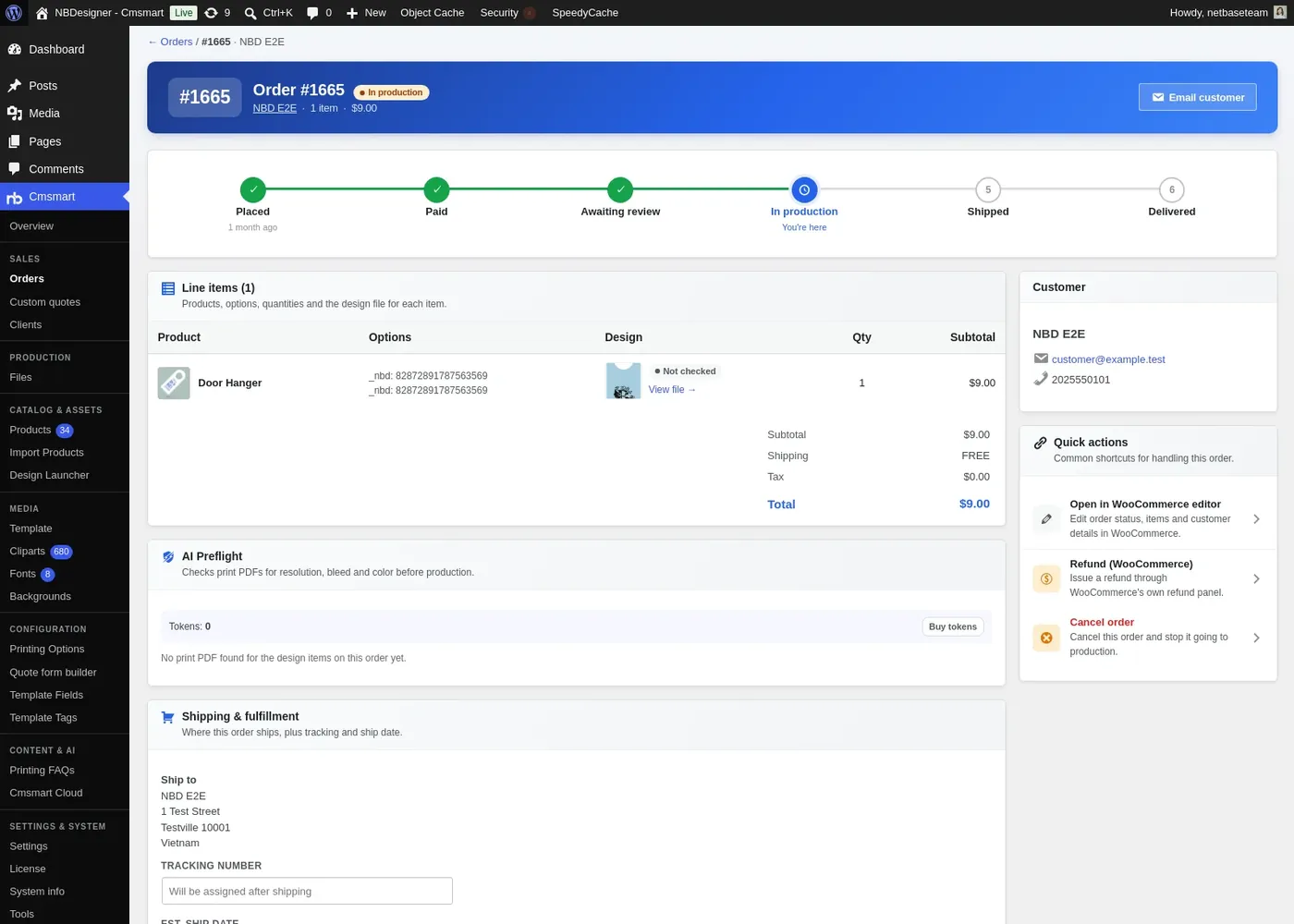
Files and options on the order
The order shows options, design and files for each line, ready for prepress.
Verified capabilities
Checked against the plugin source (version 2.17.1) and its changelog. Anything else is listed under custom development.
Upload with or without design
Per product, switch on the online designer, artwork upload, or upload without design.
File rules per product
Allowed and blocked types, number of files, minimum and maximum size in MB and a minimum DPI for JPG.
Image previews
Uploaded images get a preview at the width you set, with DPI recorded on the advanced upload page.
Cloud sources
Optional upload from Facebook, Instagram, Google Drive and Dropbox.
Advanced upload with crop
A photo-frame or wallpaper mode lets customers crop each image to the product shape.
Upload, design or hire a designer
An artwork field offers upload, design online or ask the experts, each with its own price or cart fee.
Re-upload after checkout
Customers can replace a file from the cart and from the order.
Safe by default
Executable and script files are always rejected, and SVG uploads are sanitised.
How it works
How an uploaded file reaches production
The file follows the order from the product page to your prepress team.
1
Choose how to order
Upload a file, design online or ask your team to design it.
2
Upload and crop
File rules run on upload; photos are cropped to the product shape.
3
Files land on the order
Your team downloads each file from the order line.
4
Check before print
AI Print Preflight flags low-resolution artwork for review.
Use cases
Who uses Order Upload
The same module, set up for different products and buyers.
Print shops
Customers with a print-ready PDF skip the designer and upload it with the order.
Stationery and cards
Upload finished artwork while size and paper are priced by Pricing Options.
Signage and large format
Agencies upload artwork for banners and posters, checked for size and DPI.
Labels and packaging
Brand teams upload approved files and replace them from the order if needed.
Feature table
Order Upload at a glance
Every option, rule and output in one place.
Per-product switches
Enable design, enable upload design, enable upload without design
File rules
Allowed types, disallowed types, number of files, min and max size (MB), min DPI for JPG
Global rules
Login required to upload, min and max files, min and max size, preview width
Sources
Computer, plus optional Facebook, Instagram, Google Drive and Dropbox
Advanced upload
Upload page for photo frames and wallpaper, DPI recorded, crop per image
In the option form
Upload field, number of upload files, artwork actions (upload, design online, hire designer)
After checkout
Re-upload from the cart and from the order, files in the admin email, download from the order
Security
Executable and script types always rejected, SVG sanitised
Proof
Shipping today, and you can try it live
Everything on this page runs on our public demo store. Open it, change the options and watch it work before you install anything.
Teams in 80+ countries run their ecommerce projects with Cmsmart
“★★★★★★★★★★
Excellent service for the right price!
- Fast support by chat / video!
Happy to work with people like Chuong, always ready to fix all needs.
Hope to work for many years with them.
The website is very well made. However, I would like to point out the quick response of the staff, especially Ms. Andrea, who solved all our problems very quickly and kindly. Thanks.
NBDesigner is a very robust plugin for printing shops. It may take a bit of time to learn, as I am, but the support team is there to help. I've been in printing 30 years and I am impressed with how the developers have thought this plugin through. It has everything.
Straight answers about Order Upload, checked against the plugin.
Can WooCommerce customers upload a file on the product page?
Yes. With Cmsmart Product Designer you switch on Upload Design per product, and customers attach their files before they add to cart.
Can I sell a product with upload only, without the designer?
Yes. Switch on Upload Without Design for that product and the upload becomes the main path to the cart.
Which file types and sizes can I allow?
You choose allowed and disallowed types, the number of files and the minimum and maximum size in MB per product, with defaults in the plugin settings. Executable and script files are always refused.
Can the plugin warn about low-resolution images?
Yes. You can set a minimum DPI for JPG uploads, and AI Print Preflight can flag low-resolution artwork and check the print PDF before production.
Can a customer replace a file after ordering?
Yes. Customers can re-upload from the cart and from the order, and the order shows the latest file.
Can uploads go straight to our production system?
That is custom development: we can push files to a hot folder, MIS or cloud storage after a short scoping call.




 Account Manager
 Project Manager
 Business Analyst
 Developers & QA


 Sven v B

 Verified on Trustpilot
 Juš Jordan Kondić
 Pamela Redman