Explore product personalization and 3D preview options for custom-product workflows.
Plan around your store requirements.
Talk with Cmsmart about implementation options.
What you can explore:
- ✅ Product options for configurable products
- ✅ 3D previews for custom-product workflows
- ✅ Implementation options for your store
Want ecommerce updates and resources?
Subscribe for ecommerce updates:
You'll get:
- ✔ Ecommerce tips and product updates
- ✔ Tutorials and service information
- ✔ Personalization and 3D product resources



Introduction
Revolutionizing B2B with Print-on-Demand eCommerce
In the digital age, businesses are shifting from traditional supply chains to on-demand models. Print-on-Demand (POD) empowers B2B enterprises to offer custom-branded merchandise, support procurement workflows and make products to order where the production model permits.
Smithers Pira publishes digital-printing market research. Its market-size estimates and growth assumptions provide industry context, while demand for a particular POD store depends on its buyers, products and channels.
POD is no longer exclusive to B2C. B2B clients—including corporations ordering branded merchandise and event organizers seeking custom giveaways—may consider this model for flexible ordering; costs depend on production and fulfillment.
Why B2B POD is a Game Changer
Custom Branding at Scale: Enable clients to personalize products with logos and messaging.
Low-Risk Model: Can reduce finished-goods inventory when production follows orders; setup and operating costs remain.
Streamlined Procurement: Can simplify bulk and repeat ordering when a client portal is configured for the buyer's process.
Integration Friendly: Can connect to selected ERP, CRM, and logistics systems when compatible APIs, permissions, and data mapping are in scope.
Cmsmart: Your Partner for B2B POD Success
Cmsmart has worked on eCommerce projects for over a decade and offers scoped B2B builds with customization, workflow automation, and capacity planning.
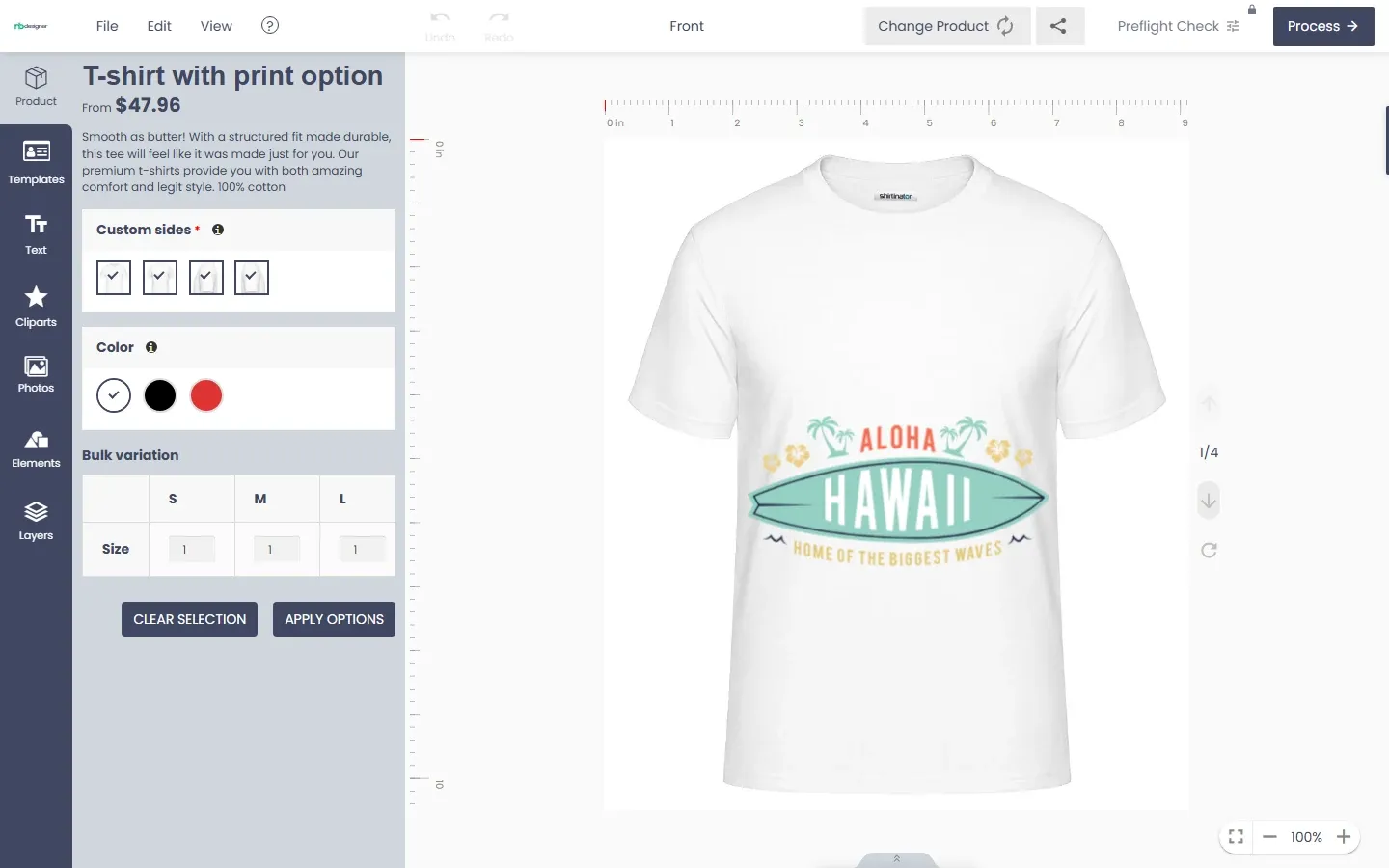
Cmsmart Online Designer: Can be configured for product design on a compatible store; 3D previews, typography, clipart, and templates depend on the selected setup and product assets.
Cmsmart Store: Cmsmart can build a WooCommerce store for agreed B2B workflows, including multi-vendor options, custom pricing, and ERP/CRM integration where compatible components and APIs support them.
What This Guide Will Cover
Essential technical and business considerations for building a successful B2B POD platform.
Leveraging WordPress, WooCommerce, and Cmsmart solutions for scalability.
Planning considerations, illustrative workflows, and market context.
Explore Cmsmart's capabilities firsthand with the Online Designer Demo and Cmsmart WooCommerce Development.
External Resources
Forrester: The Future of B2B Commerce
Statista: Global Digital Printing Revenue
HubSpot: B2B eCommerce Trends
Understanding B2B POD E-commerce
What is B2B POD E-commerce?
B2B POD eCommerce refers to a platform where businesses offer customized products, such as branded merchandise, in a just-in-time production model. Instead of managing large inventories, companies produce items on demand when clients place orders.
This model can reduce finished-goods inventory and support repeat ordering, depending on demand, fulfillment, and costs. Print-on-demand platforms integrated with systems like Cmsmart Online Designer can be configured for custom designs alongside scoped bulk-order and pricing workflows.
Key Differences Between B2B and B2C POD
Order Volume: B2B transactions often involve bulk purchases, recurring orders, and long-term contracts.
Customization Levels: B2B clients require more complex personalization options, including corporate logos, employee-specific items, and event-specific branding.
Pricing Models: Unlike B2C, B2B pricing must account for volume discounts, negotiated contracts, and tiered pricing structures.
Integration Needs: B2B platforms should assess which ERP, CRM, and procurement integrations buyers need and which systems can exchange the required data.
Why B2B Businesses Need Custom POD Solutions
Scalability: Can support growing order volume when production capacity, suppliers, and inventory inputs are planned.
Brand Control: Can support brand controls across selected products and markets when assets and approvals are maintained.
Procurement Efficiency: Can organize ordering and approvals when configured around the buyer's process.
Data-Driven Insights: Can report on ordering and customization data when tracking and reporting are configured.
Explore More
Explore Cmsmart Online Designer Demo
Discover Cmsmart Store Solutions
Deloitte: Reframing Revenue Growth
Statista: Digital Printing Market Size
Why Choose Cmsmart for B2B POD Development
Cmsmart’s Legacy and Expertise
Cmsmart has worked with eCommerce businesses for over a decade and can build configurable B2B POD platforms under an agreed project scope. A build can include bulk ordering, custom branding, workflow automation and back-end integrations when the selected systems support them. Capacity, support and delivery targets belong in the project plan.
Cmsmart Online Designer: Empowering Product Customization
The Cmsmart Online Designer is a feature-rich solution that enables clients to design custom products directly on your eCommerce platform. Key features include:
Live Preview: Real-time visualization of design changes.
Advanced Typography and Cliparts: Rich text options and clipart libraries for versatile customization.
Template Management: Pre-built and custom templates to streamline the design process.
3D Mockups: Previews for configured products where compatible mockup assets are available.
WooCommerce Integration: Cmsmart can build an Online Designer workflow for a WordPress/WooCommerce store when the selected plugin, theme and WooCommerce versions are compatible. The implementation can cover design handoff, cart details and checkout testing within the agreed scope.
Cmsmart Store: Scoped B2B eCommerce Builds
The Cmsmart Store can be scoped as a WooCommerce B2B build with options such as:
Multi-Vendor and Multi-Store Support: Can be built for selected vendor roles, catalogs, and stores under an agreed scope.
Custom Pricing and Volume Discounts: Can be configured for agreed client pricing, quantity rules, and contract terms.
ERP and CRM Integration: Cmsmart can build an integration with selected ERP or CRM systems when compatible APIs and permissions are available. The agreed implementation can map inventory, order and customer data, with synchronization timing, failures and reconciliation tested for those systems.
Advanced Order Management: Can cover approvals, fulfillment handoff, and tracking where the selected systems support them.
Infrastructure Planning: Hosting capacity and security controls should be chosen and tested for the expected traffic and data.
Learn More
Cmsmart Online Designer Demo
Cmsmart Store Showcase
Cmsmart Online Designer Features Overview (YouTube)
BigCommerce Guide to B2B Ecommerce
Core Features of a Cmsmart-Powered B2B POD Platform
Advanced Product Customization with Cmsmart Online Designer
The Cmsmart Online Designer offers configurable product-design tools for a compatible B2B POD platform. Key features include:
3D Product Previews: Let clients preview designs on products with configured 3D assets and compatible plugin settings.
Template and Clipart Libraries: Enable easy access to brand assets and design elements.
Advanced Typography Controls: Offer a range of text styling options for unique branding.
Layer Management: Allow clients to adjust, lock, and arrange design elements.
Multi-Language and Currency Support: Language options depend on configuration; currency handling depends on the connected store and payment setup.
Dedicated Client Portals and Custom Pricing
With Cmsmart Store, Cmsmart can scope client portals on a compatible store, with options such as:
Custom Catalogs: Show account-specific products when catalog permissions are configured.
Volume-Based Pricing: Apply configured quantity or contract pricing rules.
Order Approval Workflows: Include buyer-side approval steps when the workflow and roles are defined.
API and ERP/CRM Integrations
Integration with Popular Systems: Explore Salesforce, SAP, or custom ERP connections where their APIs, permissions, licensing, and data mapping permit the agreed integration.
Automated Data Synchronization: An integration can update inventory, order and customer records when connected systems support the required data exchange. Update frequency, monitoring and reconciliation are part of the implementation because records are not automatically current in every system.
Bulk Ordering and Quick Reorders
CSV Uploads: Can accept bulk order files when CSV format, validation, and error handling are implemented.
Reorder Functionality: Can support repeat orders when product, pricing, and account rules allow them.
Advanced Analytics and Reporting
Custom Reports: Can report available order, design, and delivery data when the sources are connected.
Client-Specific Dashboards: Can show account-level order and spend data when permissions and reporting are configured.
Learn More
Cmsmart Online Designer Demo
Cmsmart Store Features
BigCommerce Guide to B2B Ecommerce
Forrester B2B Commerce Blog
Designing a User-Centric B2B POD Experience
Branded Client Dashboards and Personalized Experiences
For a B2B Cmsmart Store project, Cmsmart can build branded client dashboards under an agreed scope. Account-specific catalogs, order information and personalized options depend on the selected platform and customer data; the following workflows show what a dashboard may include:
Customize the Interface: Tailor the portal design and branding to match each client's identity.
Showcase Relevant Products: Display curated product selections based on client preferences.
Track Orders Easily: Show available order status and tracking data; update timing depends on connected systems.
Offer Personalized Promotions: Use permitted account data for configured offers where consent and privacy settings allow.
Order Tracking and Notifications
Live Updates: Show processing, production, and shipping updates when connected systems provide them; timing varies by source.
Automated Notifications: Configure email or SMS notices when the provider, consent, and event data support them.
Bulk Upload, RFQ, and Multi-Language Support
Bulk Upload: Can accept CSV order files with agreed fields, validation, and error handling.
Request for Quote (RFQ): Can collect quote requests and route approvals through a defined workflow.
Multi-Language and Currency: Plan translations, currencies, taxes, and payment options for selected markets.
Responsive Design for All Devices
Mobile Optimization: Ensure a consistent and user-friendly experience on desktops, tablets, and smartphones.
Accessibility: Test the implemented experience against applicable WCAG criteria and remediate identified barriers.
Learn More
Cmsmart Online Designer Demo
Cmsmart Store Customization Options
HubSpot: B2B Customer Experience Strategies
Statista: Global Mobile Commerce Trends
Backend Automation and Workflow Optimization
Order Automation and Integration with Print Providers
Automated Routing: Can route orders to selected providers or in-house production after compatible integrations and exception handling are configured.
API Integrations: Cmsmart can scope order routing to Printful, Printify or a custom production system when the chosen APIs, plans and data model support it. The build can include artwork and order fields, status exchange, error handling and fulfillment handoff.
Dynamic Pricing and Volume Discounts
Flexible Pricing Models: Define pricing rules for volume, account contracts, and customization when supported by the store setup.
Automated Discount Calculations: Apply configured discount rules to eligible bulk orders; review margins and exceptions.
Tax, VAT, and Compliance Planning
Automated Tax Calculations: Configure tax, VAT, and exemption rules for the selected jurisdictions and have the resulting calculations reviewed.
Regulatory Compliance: Assess applicable privacy and payment-security obligations for the deployed store, provider contracts, data flows, and operating processes; software features alone do not establish compliance.
Hosting Capacity and Security Controls
Hosting Capacity: Choose hosting for forecast traffic, test capacity, and plan monitoring and scaling.
Data Security: Plan TLS, abuse protection, and a suitable payment provider; verify controls in the deployed environment.
Learn More
Cmsmart Online Designer Demo
Cmsmart Store Infrastructure Options
WooCommerce Hosting Best Practices
Gartner Cloud Market Report
Cost Structure and Investment Overview
Cmsmart Online Designer and Store Project Costs
Online Designer: Check the current plugin license and project quote. Total cost depends on the selected design features, compatible extensions, and any integration work. Learn more at Cmsmart Online Designer.
Cmsmart Store: Ask for a current WooCommerce development quote and any separately priced plugins, hosting, and support. Explore options at Cmsmart Store.
WordPress/WooCommerce Plugin and Custom Development Costs
WooCommerce Plugins: Costs vary from free to premium, depending on functionality (e.g., payment gateways, shipping integrations).
Custom Development: Tailored workflows, unique features, and branding customizations. Investment depends on project scope and timeline.
Developer Support: Budget for maintenance, updates, and fixes under the selected support agreement.
Hosting, Security, and Ongoing Maintenance
Hosting Options: Options include shared, VPS, or dedicated cloud hosting. Costs vary based on traffic volume and storage needs.
Security Investments: Budget for TLS, security controls, and the assessment and operation needed for applicable privacy and payment requirements.
Regular Updates: Plugin, theme, and platform maintenance to reduce compatibility and security risk, with staging tests and backups.
Custom Support Packages and Account Management
Dedicated Account Managers: Confirm whether an account manager is included in the agreed support package.
Service Level Agreements (SLAs): Request written response targets and support coverage where an SLA is required.
Training and Onboarding: Scope any team workshops or tutorials in the implementation agreement.
Learn More
Cmsmart Online Designer Pricing
Cmsmart WooCommerce Development
WooCommerce Cost Analysis
Shopify vs WooCommerce Cost Comparison
Cost Structure and Investment Overview
Cmsmart Online Designer and Store Project Costs
Online Designer: Check the current plugin license and project quote. Total cost depends on the selected design features, compatible extensions, and any integration work. Learn more at Cmsmart Online Designer.
Cmsmart Store: Ask for a current WooCommerce development quote and any separately priced plugins, hosting, and support. Explore options at Cmsmart Store.
WordPress/WooCommerce Plugin and Custom Development Costs
WooCommerce Plugins: Costs vary from free to premium, depending on functionality (e.g., payment gateways, shipping integrations).
Custom Development: Tailored workflows, unique features, and branding customizations. Investment depends on project scope and timeline.
Developer Support: Budget for maintenance, updates, and fixes under the selected support agreement.
Hosting, Security, and Ongoing Maintenance
Hosting Options: Options include shared, VPS, or dedicated cloud hosting. Costs vary based on traffic volume and storage needs.
Security Investments: Budget for TLS, security controls, and the assessment and operation needed for applicable privacy and payment requirements.
Regular Updates: Plugin, theme, and platform maintenance to reduce compatibility and security risk, with staging tests and backups.
Custom Support Packages and Account Management
Dedicated Account Managers: Confirm whether an account manager is included in the agreed support package.
Service Level Agreements (SLAs): Request written response targets and support coverage where an SLA is required.
Training and Onboarding: Scope any team workshops or tutorials in the implementation agreement.
Learn More
Cmsmart Online Designer Pricing
Cmsmart WooCommerce Development
WooCommerce Cost Analysis
Shopify vs WooCommerce Cost Comparison
Illustrative B2B POD Workflows
Corporate Merchandise Platforms
A corporate merchandise team could scope a Cmsmart-powered B2B POD build for branded employee or client products. Bulk orders, logo controls, and reordering depend on the selected workflow; time savings and error rates need measurement after launch.
Event Merchandise Solutions
An event organizer could scope a POD platform for branded giveaways and apparel. A Cmsmart multi-vendor build could coordinate selected suppliers when roles, catalog ownership, and fulfillment handoffs are defined.
White-Label POD Solutions for Agencies and Resellers
An agency or reseller could use a scoped Cmsmart build to offer branded POD products. Inventory and fulfillment responsibilities depend on its supplier contracts and operating model.
Learn More
Cmsmart Online Designer Demo
Cmsmart Store Multi-Vendor Features
HubSpot B2B Ecommerce Examples
Conclusion and Next Steps
Building a B2B Print-on-Demand platform involves product customization, bulk ordering, branding, integrations and support choices. Cmsmart Online Designer and Cmsmart Store can be scoped with WordPress and WooCommerce where version and platform compatibility support the required workflow. Capacity and operational efficiency depend on hosting, data, process design and adoption.
By prioritizing automation, personalization, and secure, scalable infrastructure, a B2B POD platform can address defined buyer needs; acquisition and retention outcomes require measurement.
Key Takeaways:
Invest in customizable product design tools to empower clients.
Use client-specific catalogs and pricing to tailor the experience.
Scope workflow automation and compatible API and ERP/CRM integrations.
Plan and verify hosting security controls and applicable compliance requirements for the deployed store.
Focus on a user-centric experience with responsive, branded client portals.
Ready to get started?
Explore Cmsmart’s solutions and book a personalized consultation to tailor a B2B POD platform that fits your unique business needs.
Explore Cmsmart Online Designer
Discover Cmsmart Store
Contact us at: [email protected]