AI Token Wallet Costs: Plan Your Cmsmart AI Budget

See exactly what drives AI token wallet costs in Cmsmart Product Designer, compare the four monthly plans, and get a custom AI cost quote.
- By David Nguyen
- 8 views

Table of contents
Was this tutorial helpful?

Written by
Cmsmart AI for Ecommerce Engineer
Adds practical AI to stores: image tools, preflight checks, automation and assistants.
- AI tools
- Automation
- AI preflight
- Cmsmart Cloud
The team behind it
A dedicated team runs your project
 Account Manager
 Project Manager
 Business Analyst
 Developers & QA
- Scoped first by an Account Manager and a BA
- Milestones and sprints tracked in WorkSuite
- Support and growth after launch
Table of contents
Related Posts
A buyer uploads a phone photo to a badge, a mug or a t-shirt in your designer. It looks sharp on their screen. At print size it's soft, or...
AI token wallet costs are the first question most store owners ask once they turn on AI Preflight, Background Remover or Upscale in Cmsmart Product Designer (NBDesigner) — what...
A shopper opens your product designer late one night, uploads a blurry photo from their phone, and asks for a cleaner cut-out before they buy. The fix takes seconds...

Cmsmart Ecommerce provides custom ecommerce and WooCommerce development services for web-to-print, product personalization, plugin support and API integration. For company background and team leadership, see David Nguyen.

Top
In short
AI token wallet costs are the first question most store owners ask once they turn on AI Preflight, Background Remover or Upscale in Cmsmart Product Designer (NBDesigner) — what will it actually cost per month? The honest answer is that it depends on how many designs your customers upload, how many of them need a fix, and how wide you open the door to anonymous visitors — and Cmsmart Product Designer gives you the dials to control every one of those variables from one screen.
This guide walks through what the Cmsmart token wallet actually meters, what happens the moment it hits zero, and how to turn the real numbers from your store into a monthly AI budget you can defend to a finance person. The web-to-print software market is forecast to grow from $1.43 billion in 2025 toward $3.13 billion by 2034 (Fortune Business Insights, 2026), and AI quality checks are a big part of why — so getting the cost side right now matters more than it did a year ago.
What's really driving your AI token wallet costs?
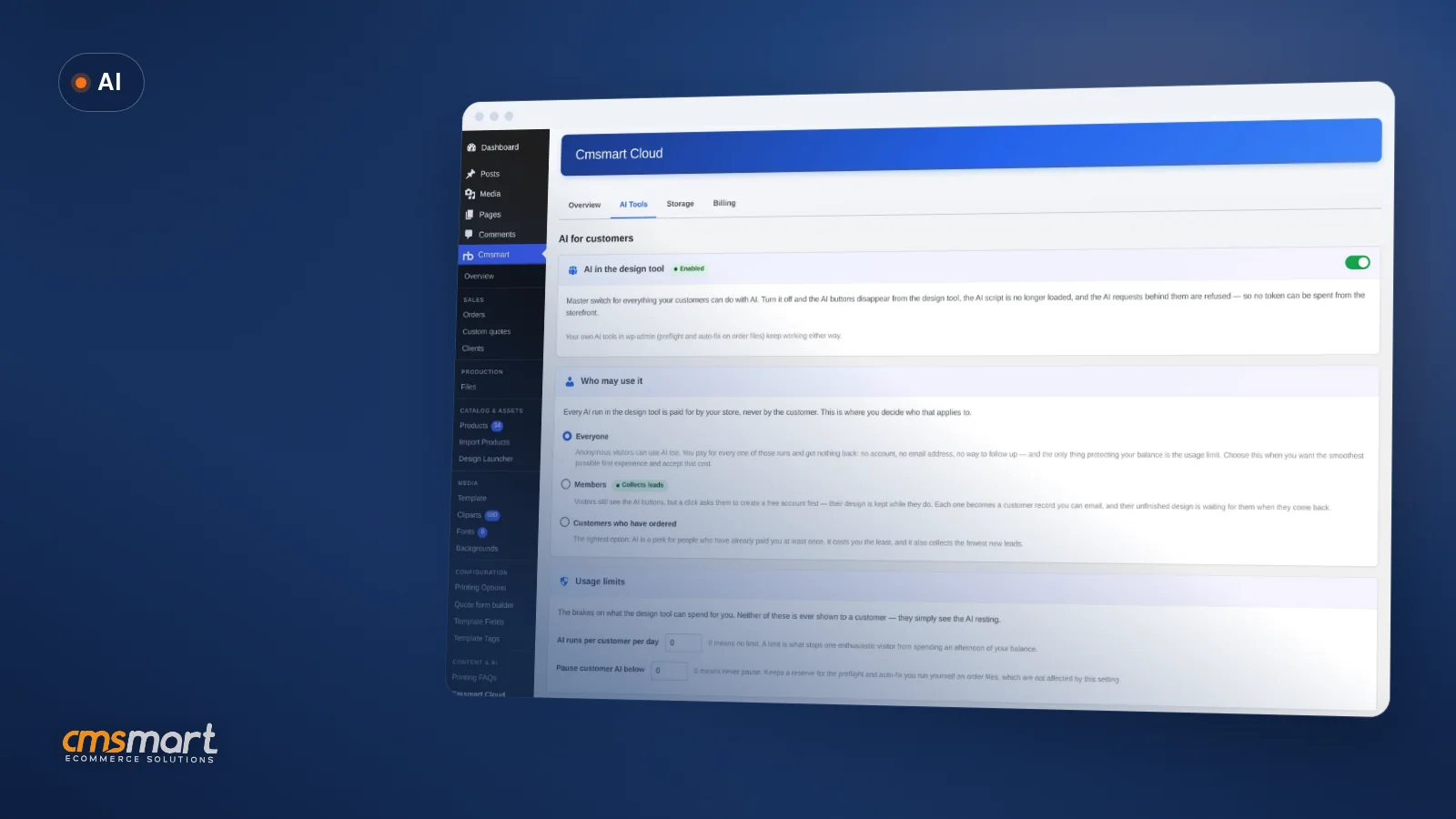
Most AI overspend in Cmsmart Product Designer traces back to one setting: who is allowed to use it. Every AI run in the design tool is paid for by your store, never by the shopper, so an open "Everyone" audience with no usage limit lets anonymous traffic spend your balance with nothing to show for it.
What would predictable AI spend look like?
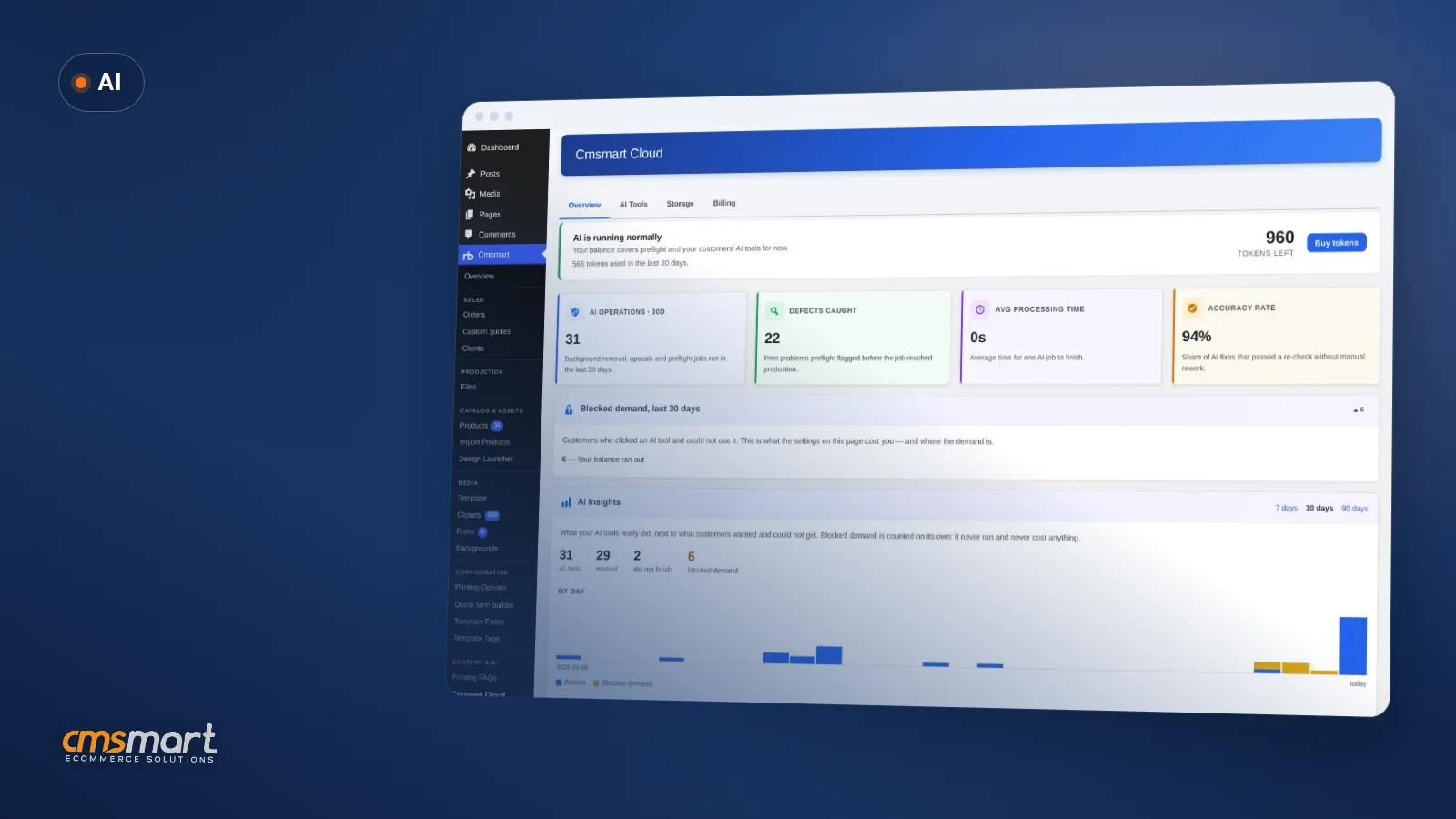
Picture opening Cmsmart Cloud on the first of the month and already knowing the number: your plan's price, nothing more, because usage limits kept anonymous AI runs in check and the Overview tab showed you exactly where tokens went. That is the outcome a token wallet is built for.
Example scenario. A print shop owner sets the audience to "Customers who have ordered," so only people who already paid can use the design tools. She sets a daily run limit so no single visitor can drain the balance, and turns on the email alert for when the wallet pauses. Each morning she glances at the Overview tab instead of chasing a mystery invoice. When a seasonal rush pushes usage close to the plan ceiling, the alert gives her two weeks' notice to upgrade a tier before anything locks — not a surprise bill after the fact.
Cmsmart insight: in our implementation work, the single biggest cause of AI overspend is leaving the audience on "Everyone" with the usage limit at zero (no limit). It is the easiest setting to forget, and it is the one that turns a curious visitor into your biggest line item.
How does the Cmsmart token wallet architecture work?
Cmsmart Cloud keeps one wallet per account, shared between the storefront's AI tools and the AI Preflight checks you run yourself in wp-admin. Four tabs — Overview, AI Tools, Storage and Billing — give a WooCommerce print shop one place to see spend, set limits and top up, instead of hunting through separate settings pages.
The pieces, all shipped in 2.17.0:
Preflight, Background Remover and Upscale are what the wallet pays for today; anything beyond that — a Slack alert when the balance drops, or a monthly cost report broken out by product line — is custom development on top of the product designer plugin, covered below.
What's the ROI on AI token wallet costs per plan?
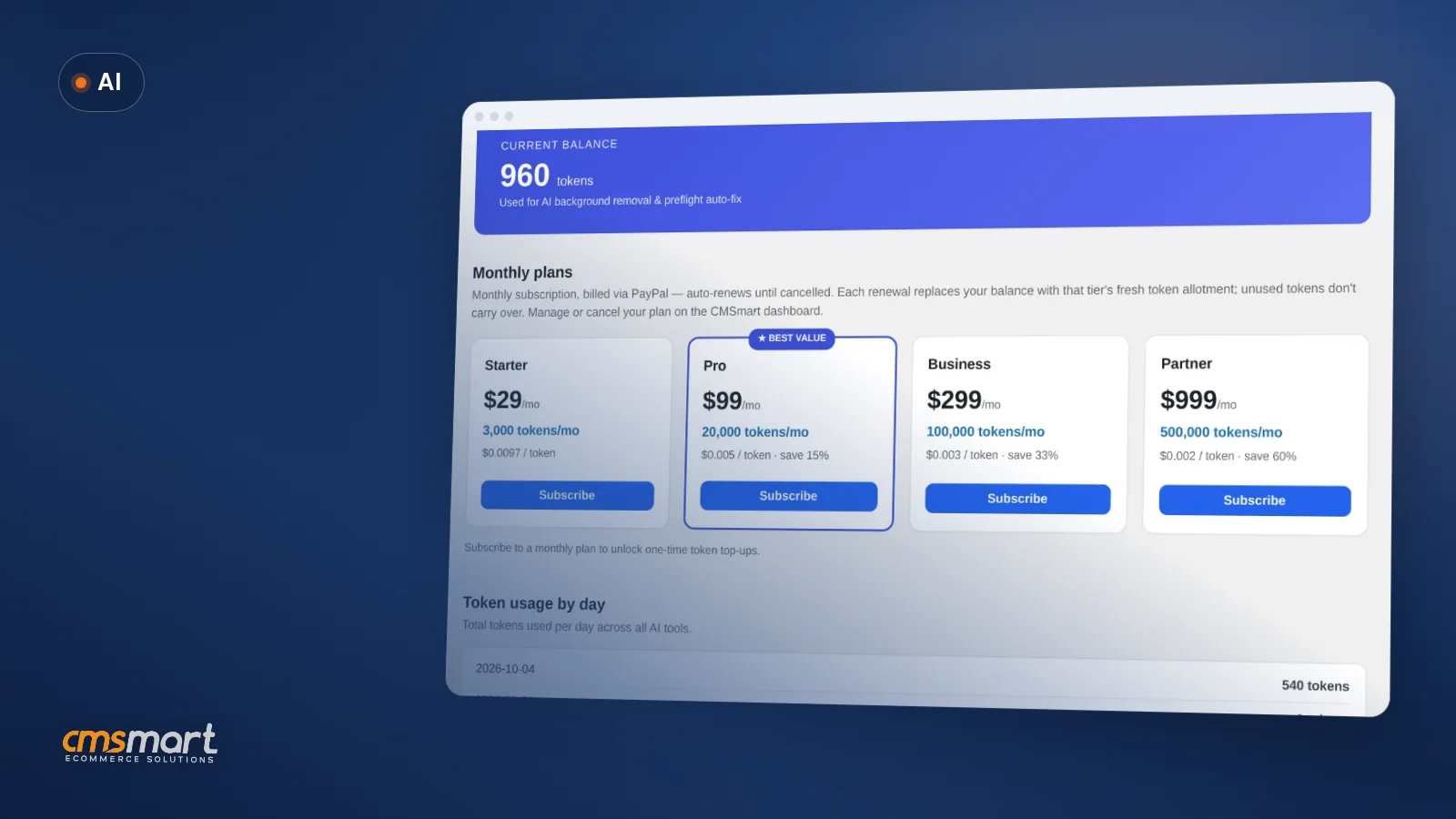
Cmsmart Cloud bills four fixed monthly tiers through PayPal — Starter, Pro, Business and Partner — each with its own token allotment. Every renewal replaces the balance with that tier's fresh amount; unused tokens never carry over, so the plan you pick should match a typical month, not your busiest one.
As captured in the Cmsmart Cloud Billing tab in October 2026 (plans may change): Starter is USD 29 a month for 3k tokens, Pro is USD 99 for 20k, Business is USD 299 for 100k, and Partner is USD 999 for 500k. A Preflight Check run costs a small, fixed number of tokens; Upscale and Background Remover cost more and scale with image size — a background cut-out on a larger photo uses noticeably more than a small one, since it is metered by megapixels, not a flat fee per click.
Cost worksheet — fill in your own numbers:
How do you set up and configure AI cost controls?
You configure the whole token wallet from Cmsmart Cloud in wp-admin: who may use AI, how much they can use per day, what happens at zero, and which plan funds it. No code, no separate account — just the license you already have.
Full field-by-field detail for upscale engines and required DPI lives on the Cmsmart AI token wallet page; this walkthrough covers the settings that move your monthly bill.
Going further: what Cmsmart builds beyond the token wallet
The wallet tracks spend inside wp-admin; most growing print shops eventually want that data somewhere else too — a finance tool, a client invoice, or an alert outside email. That connective work is custom development Cmsmart builds on top of Cmsmart Product Designer, not a built-in setting.
Every engagement follows the same path: discovery call, a short solution design, build in sprints, QA against a staging copy of your store, launch, and ongoing support — the same delivery model behind our ecommerce project work.
Get a custom AI cost-control quote
Why work with Cmsmart on AI cost control?
Cmsmart has built ecommerce and web-to-print solutions as a Netbase JSC division since 2012, including the AI tools and token wallet inside Cmsmart Product Designer itself — so the team that built the metering is the same one that can extend it for your store.
Cmsmart has delivered 6,300+ client projects and 4,600+ completed builds since 2012, including 500+ custom development engagements, with 1,800+ stores live today across 80+ countries (Cmsmart platform data). The company holds a 4.2 rating from 404 reviews on Trustpilot. See related work on /ecommerce-projects or talk to an ecommerce expert about your own AI budget before you commit to a plan.
Frequently asked questions
What happens when the AI token wallet runs out?
AI does not stop with an error. Shoppers see the assistant "resting" — never a balance or a price — and can ask to be notified when it is back; that builds a waiting queue your store emails automatically once you top up. In wp-admin, you get one email at the start of the pause and at most one digest a day after that, not one per failed request.
Does the balance roll over to next month?
No. Each monthly plan renewal replaces your balance with that tier's fresh allotment, and unused tokens do not carry over. One-time top-up packages are available once you are subscribed to a plan.
Who pays for AI — the store or the shopper?
The store. Every AI run in the design tool is billed to your Cmsmart Cloud wallet; shoppers never see a token count or a price, whatever your audience setting.
Does running AI Preflight on every order cost tokens?
Yes, each Preflight run uses a small, fixed number of tokens. You can run it manually per order, or turn on automatic mode so it scans once when an order goes on-hold; automatic mode pauses itself below the token floor you set, instead of draining the wallet.
Can we limit AI to customers who have already ordered?
Yes. The audience setting under AI Tools offers Everyone, Members, or Customers who have ordered — the tightest option, since it only extends AI to people who have already paid you at least once.
Can Cmsmart build custom spend alerts or reporting on top of the wallet?
Yes — webhook alerts to Slack or Teams, per-client chargeback reports and usage-based auto top-up rules are all custom development Cmsmart builds on top of the plugin's AI usage log; see Going further above.
Plan your AI budget before you turn the tools on
Get the audience, limits and plan right from day one, or have Cmsmart build the alerts and reporting your finance team actually wants.
Get a custom AI cost-control quote See the AI integration service
Related reading: AI you control in Cmsmart Product Designer 2.15 · How DPI affects print quality
David Nguyen
Direct contact & support
Need help fast? Message me anytime: